Hermes Accessories: Spreadsheet vs Google Sheets
- Editorial notes
Specific Tasks for Organizing hermes Accessories Candidates If your goal is to screen a few candidates from the fashion-reps hermes accessories catalog, then pass colors, specifications, product pages, and pending questions to yourself or a teammate for review, the core issue is not "which spreadsheet is more advanced," but how to ensure every candidate can be traced back to the original page and clearly mark which information cannot be directly conclud
Specific Tasks for Organizing hermes Accessories Candidates
If your goal is to screen a few candidates from the fashion-reps hermes accessories catalog, then pass colors, specifications, product pages, and pending questions to yourself or a teammate for review, the core issue is not "which spreadsheet is more advanced," but how to ensure every candidate can be traced back to the original page and clearly mark which information cannot be directly concluded.
This article is suitable for readers who need to:
- Discover bag, belt, jewelry, or other accessory candidates in the brand catalog
- Save visible information such as product name, page link, color, and specifications
- Distinguish between content already seen and fields that require opening the product page to confirm
- Filter, sort, and collaborate on review in Google Sheets
It is not suitable for treating catalog names or reference prices directly as stock, authenticity, material, seller promises, or final transaction terms. Prices, inventory, page content, and link status may change, and the product pages should be reopened for verification before publishing. The date recorded for this website-style catalog interface is October 15, 2026.

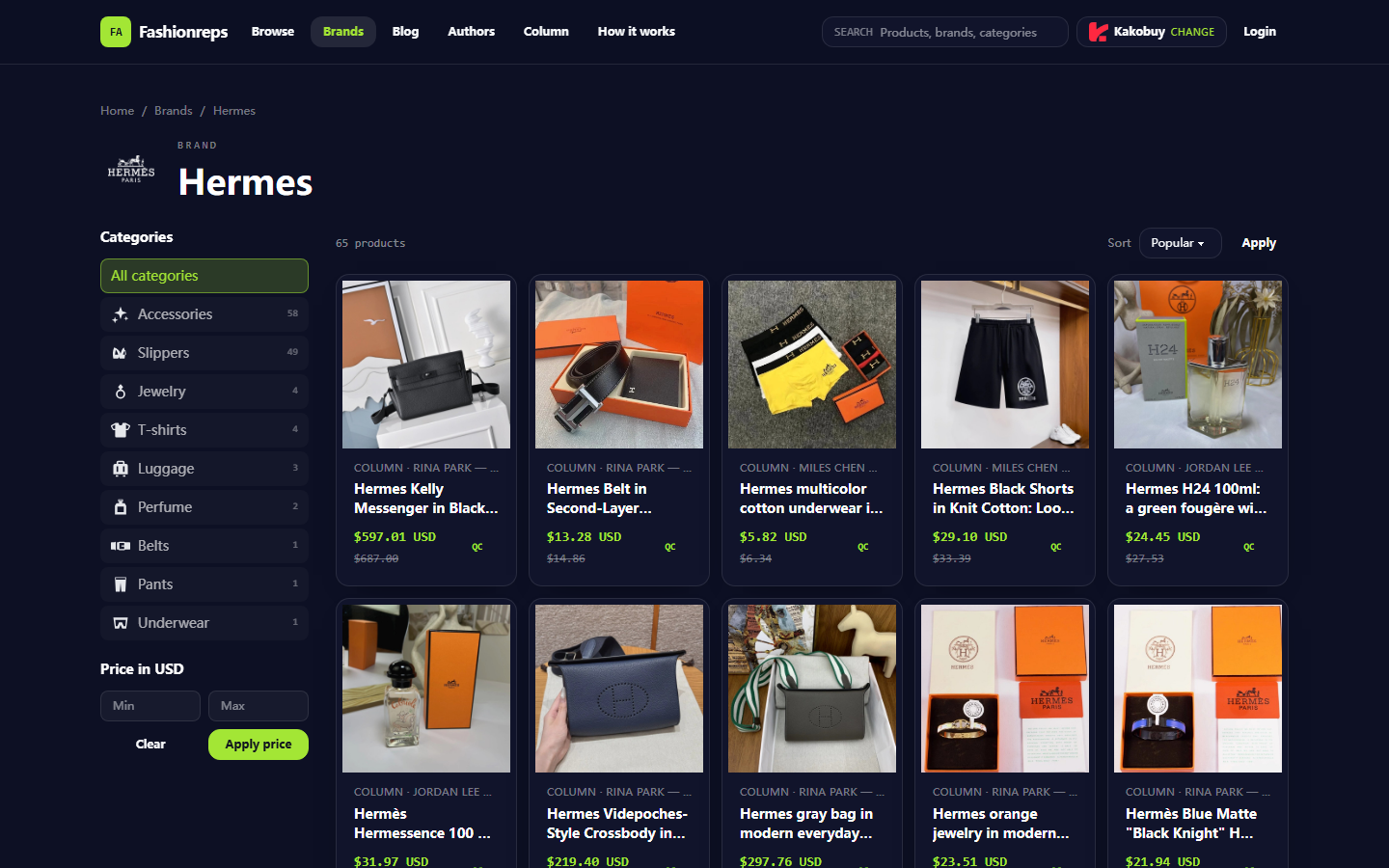
Image: fashion-reps Hermes brand catalog page, showing categories, price filters, sorting, and product card links.
Checking Catalog Entries and Product Cards from the fashion-reps Website-Style Spreadsheet
The "Spreadsheet" here is closer to a structured product catalog within the website, rather than a freely editable spreadsheet. On the Hermes brand page, brand filters, category filters, USD price ranges, sorting options, and product cards are visible. The page summary shows that the brand catalog listed 65 products at the time, including categories such as Accessories, Slippers, Jewelry, T-shirts, Luggage, Perfume, Belts, Pants, and Underwear.
For accessory candidates, the catalog page is suitable for the first round of discovery: first enter the page by brand, then narrow down to relevant categories such as Accessories, Jewelry, Luggage, or Belts, and then decide whether to open further based on product names and card information. The page also offers sorting options like Popular, Latest, Price: low to high, and Price: high to low, which help establish an initial candidate range.
On the catalog cards, you can see product titles, editorial sections, reference prices, and some product descriptions. For example, the page shows Kelly Messenger, belts, Videpoches-style crossbody bags, bracelets, and other accessory entries. The visible content here only indicates that the page displayed these candidates at that time and cannot replace the verification of colors, sizes, materials, inventory, and purchase links on the product detail pages.
A basic recording method for the website-style catalog can follow this order:
- First, record the catalog entry and the original title from the product card.
- Then open the product page to confirm whether the page still exists and save the actual product page link.
- Record colors or appearance descriptions that can be directly identified from images separately from the textual specifications on the page.
- Mark fields without clear answers as pending verification, rather than filling them in based on the title.
- Recheck the page, options, price, and purchase platform link before placing an order.
How to Set Up Candidate, Link, Color, and Size Columns in Google Sheets
Google Sheets is more suitable for organizing candidates into a worksheet that can be filtered, supplemented, and collaboratively reviewed. It is recommended to put only one product candidate per row, and do not mix multiple colors or multiple pages in the same cell. This makes filtering by color, category, or verification status clearer later on.
You can start with the following fields:
| Field | How to Record | Notes |
|---|---|---|
| Candidate ID | e.g., HERMES-001 | Keep unique to avoid duplicate candidates |
| Product Name | Copy the visible name from the catalog or product page | Do not rewrite as "authentic" or "same style" |
| Category | Bag, belt, jewelry, etc. | Use the category visible on the page |
| Catalog Entry | Brand catalog or category page | Used to trace the source of discovery |
| Product Page | Actual product page after opening | Mark as abnormal if the page cannot be opened |
| Color | Record the color explicitly stated on the page | Write "pending verification" if not stated |
| Size or Length | Record the specifications listed on the page | Do not infer size from image proportions |
| Page Image | Save image location or screenshot number | Images only serve as visual reference |
| Reference Price | Record currency, date, and page status | Not equal to final transaction price |
| Verification Status | Unverified, Verified, Needs review | Consistent dropdown options are more reliable |
| Notes | Record doubts, missing fields, or next steps | Only write content that drives review |
"Color" and "Size" should be separated. For example, a bag page may show descriptions like black, brown, or navy blue, but if the page does not clearly list available colors, you should write "image leans toward a certain color, options pending verification" instead of treating observations as purchasable options.
Similarly, the size field for belts or bracelets should not be judged solely from the product title. If multiple lengths or sizes appear in the title, record the original text and note in the remarks whether you need to enter the product page to confirm the options, measurement method, and units.
Comparison of Page Browsing and Sheet Filtering Steps for the Same Accessory
The website catalog and Google Sheets solve problems at different stages. The catalog is for discovery and page review, while the sheet is for comparing multiple candidates together. The most effective workflow is usually not one or the other, but to keep a traceable record between both.
The website-style catalog is suitable for:
- Discovering candidates by brand or category
- Viewing product cards, thumbnails, and page summaries
- Narrowing down by popular, latest, or price range
- Returning to product pages to check original descriptions
- Continuing to confirm next steps from the purchase platform link
Google Sheets is suitable for:
- Comparing multiple candidates at once
- Filtering by category, color, verification status, and price fields
- Adding "pending questions" and "last checked date"
- Allowing teammates to add notes or mark duplicate candidates
- Keeping a traceable checklist after review
A simple review sequence: first select 5 to 10 candidates on the catalog page, then enter them into Google Sheets; then open each product page and fill in the actual colors, specifications, images, and link status from the page; finally, filter "verified" and "needs review" and only address items that still affect the purchase decision. Do not move all catalog entries into the sheet at first, as that can turn a large number of records with little purchasing value into a maintenance burden.
How to Record Product Images, Page Specifications, and Link Update Times Separately
These three types of information are often put in the same column, making it impossible to tell later whether the problem comes from the image, the text, or the link. It is recommended to split them into at least three fields: visual record, page specifications, and link check.
The visual record describes what is actually visible in the image, such as approximate color, hardware color, silhouette, or display angle. It cannot prove material feel, weight, dimensional accuracy, or durability.
The page specifications record information explicitly stated on the product page, such as size, length, size range, material description, or color options. If the page does not state it, leave it blank and mark as pending verification; do not fill it in with adjacent products or brand common sense.
The link check records the last opened date, whether the page is accessible, whether there are redirects, and whether the product title still matches the candidate. You can use the following format:
- Last checked date: 2026-10-15
- Page status: Accessible, Redirect, 404, Insufficient information
- Title consistency: Yes or No
- Still need to confirm: Color, size, inventory, purchase link, etc.
If the page is later renamed, images removed, or becomes inaccessible, keep the old record in the sheet and change the status to "needs review" or "link abnormal." Do not overwrite original notes, as old records help determine why a candidate was kept or eliminated.
Comparison of Applicable Scenarios for Website-Style Catalog and Google Sheets
| Work Stage | More Suitable Tool | Reason | Additional Verification Needed |
|---|---|---|---|
| Discovering candidates | fashion-reps brand catalog | Allows browsing by brand, category, sorting, and price range | Whether the product page is still accessible |
| Initial screening | Catalog page plus browser tabs | Easy to compare images, titles, and page links | Whether the page text is sufficient for judgment |
| Multi-candidate comparison | Google Sheets | Can unify fields, sort, and filter | Whether each row corresponds to a unique product page |
| Team review | Google Sheets | Can add notes, status, and check dates | Whether someone has repeatedly modified or missed fields |
| Pre-order confirmation | Product page and purchase platform link | Need to return to the latest page for judgment | Price, inventory, specifications, shipping, and restrictions |
| Maintaining invalid records | Google Sheets | Can retain anomalies and historical notes | Whether to find alternative candidates |
Do not convert reference prices from the website catalog directly into budget conclusions. They can be part of the daily page record, but final judgment also needs to consider option prices, shipping, warehousing, inspection, consolidation, route, taxes, and destination country regulations. Customs and taxes should be handled according to the actual regulations of the destination country, and should not be reduced through under-declaration, split shipments to avoid taxes, or evasion of inspection.
Verification Boundaries When Pages Are Missing, Links Are Abnormal, or Fields Change
When the catalog page has a product card but the product page cannot be opened, it can only be recorded as a discovery clue, not as a confirmed candidate. When the displayed name and image are inconsistent, the current visible information on the product page should prevail, and the difference should be noted.
It is recommended to pause the purchase decision in the following situations:
- Product page returns 404 or continuously redirects
- Only images, no sufficient textual specifications
- Title includes multiple options, but the page has no corresponding selector
- Images, color names, and specification descriptions contradict each other
- Reference price exists, but currency, date, or applicable conditions are unclear
- Purchase platform link changes, and the actual landing page cannot be confirmed
- Page fields are truncated, and size, length, or material description cannot be determined
For link anomalies, you can set three statuses: Pending open, Confirmed, Needs review. For missing fields, set "Page does not state" instead of "No such attribute." The former indicates insufficient evidence, while the latter can be misread as confirmed non-existence.
Combining Both Tools for Pre-Order Review
It is recommended to adopt a closed loop of "catalog discovery, sheet organization, product page verification, sheet archiving."
First step: browse the fashion-reps Hermes brand catalog by accessory-related categories and record a small number of items you truly have interest in. The catalog page showed categories like Accessories, Jewelry, Luggage, and Belts at the time, but the category names themselves do not mean every product suits your needs.
Second step: create an independent row for each candidate in Google Sheets, filling in at least the product name, catalog entry, product page, color, specifications, image record, and verification status.
Third step: open each product page one by one. Only mark content explicitly stated or shown on the page as verified. Keep image observations and page specifications in separate columns to avoid packaging visual impressions as product facts.
Fourth step: use filters to view only candidates that are "verified but still need decision" and "needs review." The former can enter pre-purchase comparison, the latter need to be reopened or abandoned.
Fifth step: before placing an order, update the last checked date and reconfirm the page link, product options, current price, inventory notices, shipping, warehouse services, consolidation conditions, and destination country customs requirements. The sheet is only a recording tool and cannot replace the latest rules of the platform or destination country.
Saving Evidence and Executing Next Actions
A usable candidate list is not about having as many product names as possible, but that each row can answer three questions: where was this candidate found, what information has been seen, and what needs to be confirmed next.
If you want to quickly create a list, use the catalog page for discovery and then transfer a small number of candidates to Google Sheets. This reduces duplicate copying and preserves traceability to product pages.
If multiple people need to review together, Google Sheets is more suitable as a shared workspace, but field names, verification statuses, and date formats should be standardized, and multiple people should avoid overwriting the same note simultaneously.
If the page information is insufficient, the safest action is to put the candidate on hold rather than filling in gaps with titles, images, or brand common sense. This may reduce the number of candidates in the short term, but it lowers the risk of buying the wrong color, mismatched specifications, broken links, or mistaking reference prices for transaction terms.
The final savings mainly come from reducing repeated browsing, avoiding missed fields, and not continuing to invest time in invalid pages; the added cost is building the sheet, saving check dates, and re-verifying before ordering. It is more suitable for those who need to compare multiple hermes accessories, collaborate with others, or retain pre-purchase evidence. It is not recommended to use this method for bulk copying of unverified product information, nor to place an order when page status, specifications, or purchase links are unclear. 🧾 🔎 📌 ✅
Editor score 4.2 / 5
Community feedback
5 approved
Reader score 3.6 / 5 (5 ratings)
This is exactly the workflow I needed. I was losing track of which seller had which color of a bag charm. Now each row has the product page, the color, and a note like 'asked about gold hardware, waiting reply'. Simple but it works. Thanks for writing it up.
for a few candidates I honestly just use notes on my phone, a whole spreadsheet feels like overkill. but ok, if you're passing stuff to a teammate I get why traceability matters. the google sheets sharing thing is the only real advantage here.
The part about clearly marking what cannot be directly concluded is underrated. I have a 'pending question' column and a simple dropdown for status: researching, asked seller, decided. Just that alone saved me from re-checking the same pages.
honestly I just use a plain spreadsheet, never touched the fancy formulas. But the idea of tagging each candidate with the original page is good. I'd add a date column too, since stock for hermes accessories changes constantly and a week-old row is basically useless.
Solid point about traceability. I keep one column for the exact product URL and another for screenshots of the listing, because links die fast on these catalogs. What I still struggle with in Sheets is marking 'unconfirmed' details like hardware color so I don't accidentally treat them as facts later.