Puma Winter Shoes: Spreadsheet vs Google Sheets
- Editorial notes
The goal of this organization is not to turn the Puma shoes you've spotted into a straightforward "recommendation list." Instead, it's about putting candidate products, images, sizes, colors, product pages, QC entry points, and page update times into a reviewable evidence record. fashion-reps provides the product browsing and page clues on the website, while Google Sheets turns those clues into a filterable, collaborative, and revisitable candidate table. T
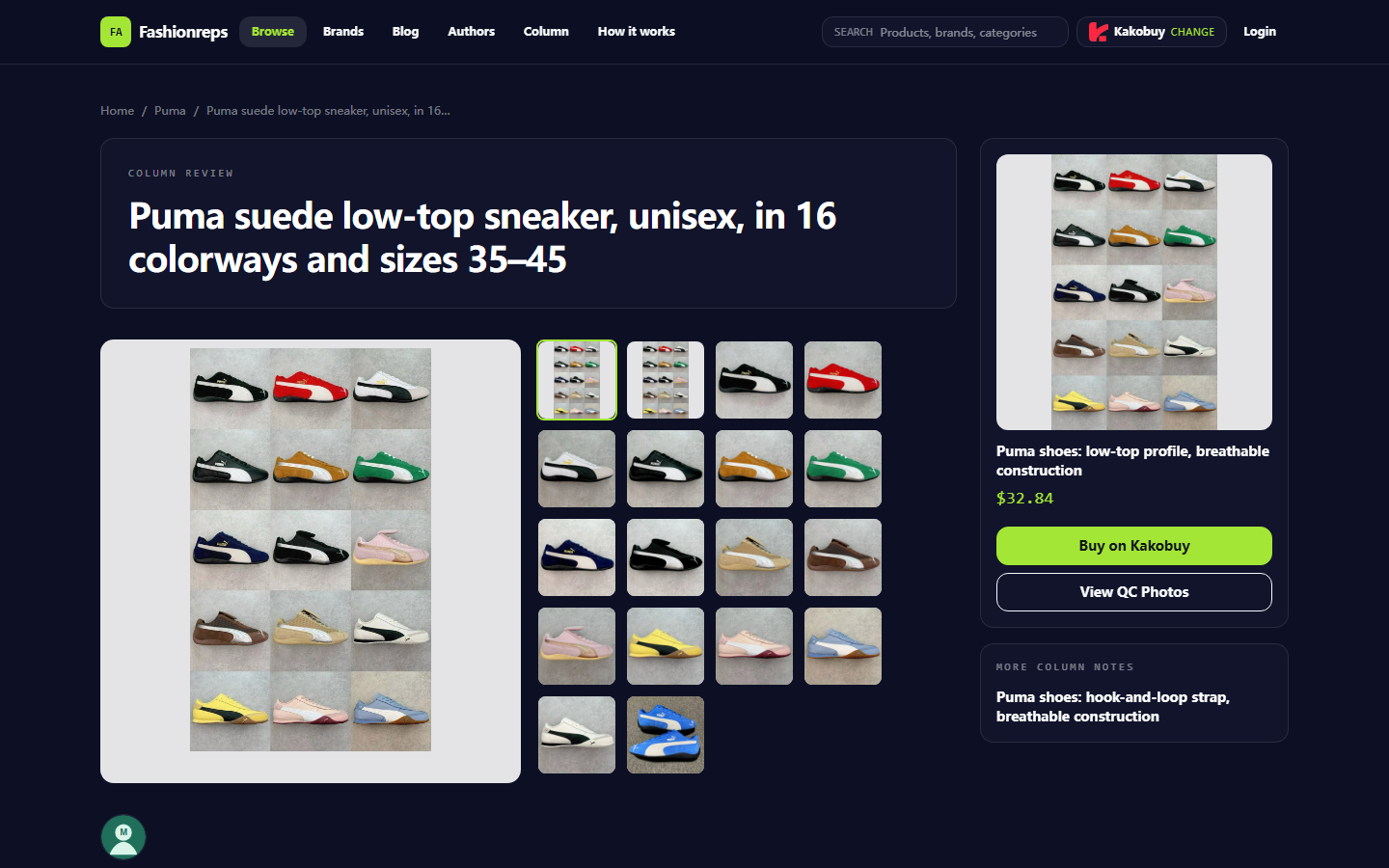
The goal of this organization is not to turn the Puma shoes you've spotted into a straightforward "recommendation list." Instead, it's about putting candidate products, images, sizes, colors, product pages, QC entry points, and page update times into a reviewable evidence record. fashion-reps provides the product browsing and page clues on the website, while Google Sheets turns those clues into a filterable, collaborative, and revisitable candidate table.
This article is for buyers who have already found several Puma winter or autumn-to-winter transition shoes but haven't yet completed a cross-check. After reading, you should be able to build a candidate table and determine which records can move to the next step of product verification and which must be put on hold. This article is not suitable for confirming real-time inventory, final shipping costs, taxes, shopping agent service fees, or after-sales results; these details need to be re-confirmed on your chosen agent's page before actually placing an order.

Image: Entry point for Puma shoe data on the fashion-reps product page. Page information should be recorded as candidate evidence and cannot replace real-time verification before placing an order.
What This puma Winter Shoe Organization Aims to Accomplish
First, narrow the task to an actionable question: After seeing multiple Puma shoe clues on fashion-reps, how do you organize the candidate records worth further checking into Google Sheets while preserving enough evidence to avoid mixing different styles, colorways, or sizes into one product entry?
Upon completion, you should be able to perform four actions:
- Create a separate record for each candidate and retain the original product page location.
- Distinguish between facts explicitly stated on the page, observable details in images, and editorial judgments.
- Filter out candidates with insufficient evidence using size, color, material description, QC entry, and update time.
- List the prices, inventory, service fees, international shipping, and destination taxes that still need confirmation before proceeding to the shopping agent's order page.
This organization is not about authenticating items or proving suitability for rain or snow. Take the currently visible Puma suede low-top sneaker page as an example: the page provides color, size, material, and buyer feedback clues, but it also clearly notes that size feedback for this shoe is divided, and suede or nubuck uppers involve cleaning and water exposure risks. Therefore, the table should preserve uncertainty rather than compressing complex judgments into "suitable" or "not suitable."
Which Fields to Check First in the fashionreps Website-Style Spreadsheet
The website-style Spreadsheet is more like a browsing-oriented product catalog. Users typically discover candidates through brand, product category, or search entry points, then open the product detail page to read images, size range, colors, and purchase entry. Its advantage is that it connects product display, detail descriptions, and subsequent purchase entry in a continuous browsing path; it is not a worksheet designed for user-defined fields, multi-person annotations, or complex version management.
After opening a candidate page, record the following in order:
- Is the product name clear? Does it correspond to the images and page content?
- What type of Puma shoe is it? Don't just write an overly broad name like "Puma winter shoes."
- Is the listed size range complete? Does it include half sizes?
- Are the number of colors and specific color names clearly stated?
- Are the material, lining, sole, or structure descriptions from visible text on the page?
- Do the product images correspond to the current style, and not other constructions or colorways on the same page?
- Does a Buy or shopping agent entry exist? After clicking, do you need to select an agent?
- Is QC Photos an entry point for reference images of this style, or does it only represent reference materials provided by the page?
- Are the page update time and QC image update time recorded separately?
The current example page shows that this Puma low-top shoe page lists 16 colorways, sizes ranging from 35 to 45, and includes some half sizes; the page also provides descriptions such as suede or nubuck upper, sheepskin lining, PU insole, and rubber outsole. These contents can go into the "page facts" column, but they should not be rewritten in the table as "warm," "waterproof," or "suitable for extreme cold," because the page information is insufficient to support such conclusions.
The page also displays a reference price and notes that the final product price, service fees, and international shipping need to be confirmed on the shopping agent's website. The table should separate the reference price from the final payable amount, and not treat the former as the settlement price. 💡
How to Build the Same Candidate Records in Google Sheets
The role of Google Sheets is to turn scattered information from multiple product pages into a unified set of fields. It's recommended that one row represents only one clear style and colorway combination; if the same product page contains multiple constructions or colors with different images, sizes, or purchase judgments, split them into multiple rows and keep the same page location in the "source product page" column.
Recommended fields are as follows:
| Field | Recording Method | Main Purpose |
|---|---|---|
| Candidate ID | PUMA-001, PUMA-002 | Prevent identifying records by long titles |
| Product Name | Record as per page name | Cross-check with original page |
| Style or Construction | e.g., low-top, Suede XL, or page-specified variant | Avoid mixing styles |
| Color | Color names written on page; mark "to be verified" if uncertain | Compare with images and options |
| Size Range | Record start and end sizes and half-size status as is | Determine if further size inquiry is needed |
| Page Material Description | Only copy or accurately summarize visible information | Distinguish facts from inferences |
| Product Page Evidence | Save page title or internal record location | Return to original page |
| QC Entry | Available, no entry, pending open | Determine next verification step |
| Page Update Time | Separate from QC update time | Assess information freshness |
| Current Status | To be verified, comparable, needs agent confirmation, on hold | Control workflow |
| Open Questions | Price, inventory, colorway, foot shape, or customs issues | Prevent omissions |
If multiple people collaborate, freeze the first row with field names and set unified options for "Current Status." Don't let one collaborator write "to review," another write "unchecked," and a third write "follow up later," otherwise filtering results will be scattered by synonymous statuses.
When creating records, copy the page facts first, then fill in editorial judgments. For example, if the page says "wide feet recommend going up half a size," record that in "Page Size Tip"; "wide-foot buyers may be better off with a half-size up" is an editorial judgment and should go in "Editor Notes," with a note that it relies on page tips and related buyer reports, not a universal sizing answer for everyone.
How to Cross-Check Product Images, Sizes, Colors, and Links Item by Item
The purpose of image checking is not to judge whether images look good, but to confirm whether they support the current candidate record. First look at the product silhouette, upper construction, sole shape, lace area, and brand markings, then colors. If the same product on a page includes multiple constructions or colorways, the main image may not be sufficient to confirm a specific option; the table should mark "image insufficient to confirm alone" rather than filling in assumptions.
Adopt an item-by-item comparison method:
- Compare product name with page title.
- Compare color names with visible images.
- Compare color options with options in the purchase entry.
- Compare size range with page size description.
- Compare upper, lining, and sole descriptions with page text.
- Record product images and QC reference images separately.
- Record the original page and the shopping agent checkout page separately.
The current page offers multiple colors and sizes for the same Puma shoe, but that doesn't mean every colorway has the same image evidence or the same feedback. Color feedback on the page may also show visual deviations—for example, red being reported as closer to pink; such content should be saved as "buyer feedback clues" and not rewritten as a definitive color difference conclusion.
In the size column, don't just fill in "35–45." If the page lists half sizes from 36.5 to 42.5, record them completely; if different constructions have different size tips, split them as well. For buyers with wide feet, high insteps, or between sizes, add a "need to measure foot length and circumference" to-do in the table, rather than deciding for them to go up half a size. 📏
For links, Google Sheets can save page identifiers or system-generated clickable entries, but manual link addition is not necessary during the organizing phase. The important thing is that each record can return to its source page, and that the product page, QC entry, and agent checkout page are not mixed into the same field.
How to Record QC Entry and Page Update Time Separately
QC entry and page update time answer two different questions: QC entry indicates whether there are reference images or inspection materials to view, while page update time indicates when the text or catalog information on the product page was updated. A page can have a newer product description but older QC reference images; or it may have a QC entry but not enough information to prove the images cover your selected color and size.
Use the following recording methods:
- "Product Page Update Time": Record according to the date shown on the page; if no date, enter "Page not shown."
- "QC Image Update Time": Record according to the date shown in the QC area; if no date, enter "Not shown."
- "QC Coverage": Record whether style, color, or size are clearly matched.
- "QC Status": Viewable, reference only, unconfirmed match, no entry.
- "Check Date": Record the date you actually opened and checked the page.
The current example page shows the product information update date as September 26, 2026, and provides an entry to view QC Photos by style. This date can be saved as page-displayed information, but it cannot infer that the images cover all colors and sizes, nor can it treat reference images as actual photos of the shoes you will receive. When the page does not replace actual order QC, the table must retain a note: "Need to re-confirm after placing order."
To avoid mistaking old data for new, set a simple filtering rule:
- Page date and check date are both clear, status is "Comparable."
- Page date missing but product fields complete, status is "Needs date added."
- QC entry exists but coverage unclear, status is "Pending open and confirm."
- Price, inventory, or purchase entry cannot return to a valid page, status is "On hold."
The Difference in Tasks Between Website Browsing and Spreadsheet Filtering
The website-style Spreadsheet is good for discovering candidates. It connects brand categories, product cards, detail pages, images, and purchase entries, allowing users to quickly understand what a product is along the page structure. Its filtering logic is influenced by the website's preset categories and usually does not allow you to temporarily add personal fields like "wide foot risk," "image evidence completeness," or "need to reconfirm price."
Google Sheets is good for organizing and comparing. You can filter by color, size range, QC status, page date, open questions, or candidate status; you can also have different collaborators add information to the same record. It does not automatically prove that product pages are real or valid, nor does it decide for you whether images correspond to specific colorways. The table simply makes the judgment process visible.
The division of labor can be understood as follows:
- fashion-reps: Discover products, view page context, confirm visible page fields, and locate the entry to the purchase process.
- Google Sheets: Unify fields, deduplicate, mark gaps, assign recheck tasks, and save judgment bases.
- Shopping agent page: Confirm real-time inventory, payable price, service fees, international shipping, and available routes.
- Post-arrival QC: Check actual order images, sizes, colors, and obvious flaws.
Therefore, you should not directly copy the website's product catalog into a "confirmed products table," nor should you first set conclusions like "winter warmth" or "rain protection" in Google Sheets and then look for pages to support those conclusions. 🧭
The Boundary Between Page Facts, Community Clues, and Editorial Judgments
A qualified candidate table must distinguish at least three layers of information.
The first layer is page facts, such as product name, listed sizes, number of colors, material descriptions, reference price, page update time, and whether a QC entry is provided. These can be directly verified against the page.
The second layer is community or buyer clues, such as wide-foot buyers suggesting going up half a size, light-colored midsoles getting dirty easily, suede uppers needing more careful maintenance, or certain colors looking different in person than in images. These clues can help arrange rechecks but do not mean all buyers will experience the same results.
The third layer is editorial judgments, such as "This record's evidence is still incomplete," "This candidate is more suitable for daily wear in clear, cold weather," or "Should not proceed to order until foot length is confirmed." Editorial judgments must state their basis and cannot be disguised as tested conclusions.
The current materials do not provide independent wear tests, receipt records, or long-term durability tests for this shoe from this site. Therefore, the table cannot contain entries like "tested," "verified waterproof," "comfortable to wear," or "can last several winters." Product descriptions and buyer feedback on the page can only help you formulate arrival inspection items, such as checking upper color, brand markings, stitching, sole edges, lining feel, and obvious dye marks; they cannot replace the actual post-receipt inspection.
Similarly, maintain boundaries on price. The reference price shown on the page is not the final expense including service fees, international shipping, taxes, and after-sales costs. Before moving to the next stage, add a "pending agent checkout confirmation" status in the table and record the destination country, because logistics routes, declaration requirements, import restrictions, and tax applicability vary by country, package information, and agent plan. Do not handle customs issues through under-declaration, splitting orders to avoid taxes, or evading inspections.
Next Steps After Completing the Review Table
After completing the table, first filter records where "product name is clear," "colors have been compared," "size range is complete," "product page can be revisited," and "QC status is recorded." Only when these fields are basically complete should a candidate proceed to the shopping agent page for further confirmation.
Proceed in the following order:
- Open the candidate product page and confirm it is still accessible and the product name and main fields have not changed.
- Check whether the specific color and size still appear in the purchase options.
- Open the QC entry and confirm whether the reference materials correspond to the target style and colorway.
- Enter the chosen shopping agent page and reconfirm real-time price, inventory, service fees, and international shipping.
- Confirm declaration, taxes, import restrictions, and available logistics routes based on the destination country.
- After placing the order, wait for actual order QC, then check color, size, markings, stitching, sole, and obvious flaws.
- If discrepancies are found between page descriptions, QC images, and the actual order, keep screenshots or records and address the after-sales window before payment or shipping.
If you're using Google Sheets for personal review of a few candidates, complete fields are more important than complex formulas. If multiple people are collaborating, lock field names, unify status values, keep change records, and ensure every conclusion can be traced back to the product page or a clear verification record.
This organizing method saves not a fixed amount of money, but time otherwise spent repeatedly opening pages, rechecking sizes, and mistaking reference prices for settlement prices. The added work is maintaining fields, recording uncertainties, and reconfirming highly volatile information before ordering. It suits buyers who are comparing multiple Puma candidates, need to collaborate with others, or want to keep a record of their choices; it does not suit those who just want to buy one pair immediately and are unwilling to maintain records. If pages become inaccessible, colors and sizes cannot be matched, QC materials have unclear coverage, or final costs don't fit the budget, it is not recommended to continue with that candidate.
Editor score 4.2 / 5
Community feedback
5 approved
Reader score 4.2 / 5 (5 ratings)
ok the Google Sheets vs spreadsheet title confused me at first lol but reading it made sense. I like that it treats fashion-reps as just the browsing source and the sheet as the actual work. Already made mine with a tab per season.
Small tip from someone who does this already: add a column for the date you last opened the product page, not just when you added it. Saved me twice from ordering a color that was swapped out. Otherwise good writeup, the collaborative bit is nice if you split orders with a friend.
The evidence record angle is a bit much for me, it's just winter shoes at the end of the day. But I do like that it says not to turn it into a recommendation list, that's the problem with most spreadsheets people share. Filterable table yes, but I'll skip half the columns.
This is exactly what I needed before the cold hits, been eyeing Puma winter pairs on fashion-reps and had screenshots scattered everywhere in my phone. Moving it all to one sheet tonight. The revisitable part is key since stock changes fast.
Honestly I never thought to use Sheets for shoe hunting but the part about logging QC entry points and page update times actually makes sense. I keep losing track of which Puma listing I saw what color on. Going to try a simple version, just columns for link, size, and date checked.